


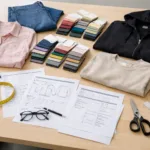





Understanding QC Reporting Template: What Factories Should Share
Maintaining strict quality standards in garment manufacturing demands accurate and transparent quality control (QC) reporting. A reliable quality inspection report template is the blueprint that guides both factories and brands to spot, record, and resolve product issues before goods leave the production floor. This article breaks down every must-have field, how to present defect photos and counts, and the essentials of corrective action plans (CAPA)—so brands and factories can keep quality transparent, accountable, and consistent.
The Role of QC Reporting in the Factory-Brand Relationship

QC reports bridge the gap between production teams and buyers. They allow real-time visibility into problems such as color discrepancies, uneven stitching, or incorrect labeling. By using a clear quality inspection report template, brands can ensure factories uphold every standard agreed in the tech pack or order specs. Factories meanwhile use the same tool to prove diligence and document any corrective steps they take.
Essential Fields in Any Quality Inspection Report Template
Let’s dig into the mandatory fields every QC reporting template should include. Whether you’re exporting hoodies or polos, this checklist guarantees nothing slips through the cracks.
- Header Information: Factory name, inspector, date/time, PO number
- Product Details: Style name, color, size run, order quantity
- Inspection Stage: Inline/Pre-shipment/Final QC
- Sample Size & AQL level: Number inspected, Acceptable Quality Level
- Defects Listing: Detailed field for each defect found
- Defect Photos (see next section)
- Severity Ranking: Critical, Major, Minor
- Defect Counts: Number of units affected
- Corrective Actions (CAPA): Steps factory will take to solve issues
- Approval Box: Buyer/factory signature fields
How to Document Defects Clearly: Photo & Quantity Standards
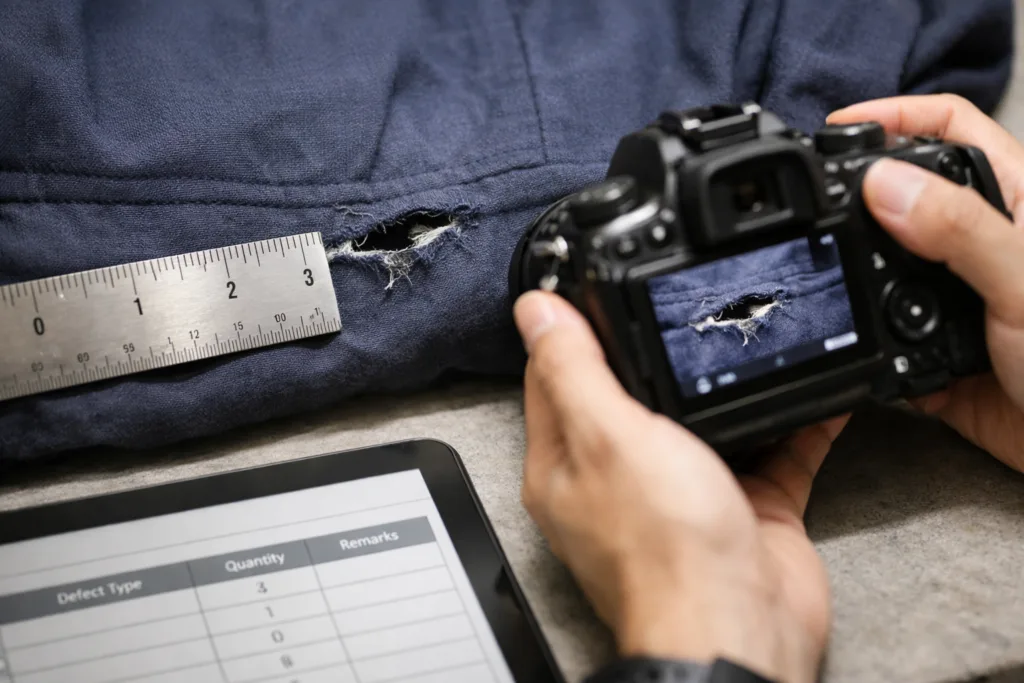
Visual evidence is fundamental. Each defect must be logged with photos—ideally high-resolution, well-lit, focused on the problem area. The shot should include a ruler or reference for scale and show both the defect and its context on the garment. Pair each photo with a tally of affected units and specify the defect type, such as skipped stitches or color bleeding. For more on defect documentation, visit our Print & Embroidery Quality Guide.
Classifying and Reporting Defect Severity (Critical, Major, Minor)
Every QC inspection needs severity ranking. Critical issues might include wrong fabric or unsafe trims; major defects affect usability or appearance, and minor flaws are cosmetic but acceptable. Consistent ranking ensures buyers know what threatens a shipment and which fixes are urgent.
Inspection Results: Accept, Reject, Rectify
At the conclusion, inspectors must state whether the lot passes, fails, or needs partial rework. This phrasing provides clarity to both brands and production teams about next steps. A QC report template should highlight this decision with a distinct section, cross-referenced with defect counts and severity analysis.
Corrective Actions: How Factories Should Use CAPA in Reporting
Corrective action plans (CAPA) are not just corporate jargon: they’re the engine for fixing and preventing repeat issues. A well-structured QC report always includes a CAPA log, describing:
- Immediate fixes (e.g., replace damaged pieces)
- Root cause analysis (e.g., needle change, worker training)
- Preventive steps (long-term process updates)
- Accountable staff and deadlines
For practical examples on CAPA in garment production, see our case study on solving quality inconsistency.
The Value of Quantitative Data: Defect Rates, AQL, and Trends
Every report should calculate defect rates (% defective out of total checked) and link this data to shipment risk. AQL (Acceptable Quality Level) charts clarify the maximum allowed number of flaws per batch—essential for both brands and factories to align expectations. Frequent breakdowns by defect type help spot patterns before they become systemic problems.
Why Consistency Across QC Templates Matters for Global Brands
If factories use varying QC templates, brands waste time interpreting them. Consistency means standardized headings, ranking logic, and layout—essential for multi-country, multi-factory sourcing. Factories following a unified template signal process control and transparency, driving smoother approval cycles and fewer disputes.
Inline QC vs Final Inspection: Which Template is Best?
Not all quality inspection report templates are one-size-fits-all. On the sewing line (inline QC), reports focus mainly on construction defects, while pre-shipment reviews add checks for packaging, labeling, and finishing. For a deep dive into timing and reporting, see Inline QC vs Final Inspection.
Mandatory Fields: What Factories Should Always Share with Buyers
QC Reporting Template: What Factories Should Share always covers:
- Detailed defect descriptions and counts
- Photos of actual issues
- Product identification fields (SKU, lot, PO)
- Inspection methods and location
- CAPA notes for all critical and major flaws
- Summary of actions (pass/fail/rework)
This clear, detailed approach prevents confusion and builds trust in the supply chain.
Integrating Buyer Requirements: The Brand’s Checklist
Buyers often supply their own QC checklist or reporting standards. Factories must map their internal QC reports to these needs, often emphasizing measurement tolerances, packaging, or compliance markers. This alignment wards off shipment blocks due to “missing information” on the report.
Why Defect Photos are Non-Negotiable
Written descriptions alone rarely suffice. Factories documenting defects with annotated, time-stamped images accelerate buyer decisions and reduce misunderstanding. For reference, compare improvement strategies outlined in our step-by-step guide for approving PPS.
Best Practices for CAPA Reporting in Garment Production
A CAPA log should be practical and unambiguous. For example, if a factory reports color mismatch, the CAPA should explain the dye bath correction steps and when retesting will occur. Ninghow, for instance, documents both actions and “ownership”—who fixes it and how progress will be tracked before the next shipment.
Common QC Reporting Mistakes and How to Fix Them
- Omitting defect quantity or location
- Uploading blurry or distant photos
- Listing corrective actions without verification
- Missing severity classification
To avoid these, some experienced production leads at Ninghow suggest using a plug-and-play QC template and training all inspectors on required evidence for every report field.
Comparing Top QC Reporting Template Formats
| Format Type | Pros | Cons |
|---|---|---|
| Excel Sheet | Flexible, easy to share | Manual data entry, risk of errors |
| PDF Form | Consistent, print-friendly | Hard to edit after creation |
| Online QC App | Fail-safe input, instant photo upload | Requires set-up and training |
| Custom ERP Module | Integrates with orders, tracks history | High-cost, developer support needed |
How Factories Can Train Teams on Reporting Consistency
Training is central to reliable reporting. Factories should run mock inspections, use sample reports for practice, and encourage open feedback loops. As seen in Ninghow’s process, routine spot checks and review meetings keep the reporting habit strong and ensure records remain actionable.
Factory Floor Insights: How QC Reporting Drives Real Results
Veteran factory teams understand that the right QC reporting template speeds up detection, correction, and communication. Reliable reports don’t just catch defects; they push process improvements by showing which problems recur and which teams need retraining.
Garment Fit Accuracy: Linking QC Reports to Size & Measurement
Fit issues are among the top reasons for retail returns. QC reports should always include measurement charts, tolerance tables, and sample photos at key measurement points. For deeper insight, check our precision tolerance strategies for 2026.
Fabric Testing and QC Reporting
QC templates that mention fabric shrinkage, GSM, and colorfastness testing add value by flagging material issues before shipment. Data on test results—linked to the product batch—should be documented with clear fields and photos of test swatches.
Packaging and Label Compliance in Reporting
For export orders, packaging accuracy and label compliance can block customs clearance. QC reporting templates should include checklist rows for each package type, barcode, and legal marking, with photos for proof.
Technology Tools: Digitizing QC Templates and Reports
Modern factories invest in online QC apps or ERP systems that automate reporting. Digital templates standardize field inputs, timestamp photo uploads, and speed up CAPA tracking—all helping factories and brands react faster to quality threats.
Real Example: AQC Reporting Template in Action
Consider a hoodie order inspected by Ninghow. Inspectors find 18 units with skipped sleeve stitches and 5 with crooked embroidery. Photos are taken, counts logged, details shown per SKU/size. The CAPA records machine needle swaps and retraining for the embroidery team. The report is signed and shared within 24 hours, allowing the buyer to approve rework and keep shipment on schedule.
Implementing Continuous Improvement through Reporting
Every inspection cycle is a quality improvement opportunity. Factories should analyze past QC reports to adjust training, tweak SOPs, and strengthen preventive controls. Results: fewer complaints, lower claim rates, and tighter brand-factory partnerships.
QC Reporting Template: What Factories Should Share

At the heart of every great garment order is transparent, data-rich QC reporting. Mandate all the above fields, demand defect photos and counts, and insist on practical CAPA plans for every issue. The right template prevents costly mistakes, protects reputations, and boosts both factory efficiency and buyer trust.
Frequently Asked Questions
What information should always be in a QC reporting template?
Every template should include product details, PO numbers, defect photos, quantity counts, severity ranking, inspection date, corrective actions, and buyer/factory approvals.
Are defect photos required in quality inspection reports?
Yes, defect photos are essential for clear documentation. They allow brands to assess the problem remotely and avoid disputes over ambiguity.
How does CAPA improve QC reporting?
CAPA (Corrective and Preventive Action) outlines how defects will be fixed and prevents recurrence, ensuring every report leads to real improvement.
What is the difference between inline QC and final inspection reporting?
Inline QC tracks production flaws in real time, while final inspection covers all finished goods and packaging prior to shipment, requiring added fields for completeness and compliance.
How are severity levels determined in garment QC reports?
Severity is ranked based on risk to product function or safety: critical (unacceptable), major (affects use), and minor (cosmetic only).
Can QC report templates be customized for buyer requirements?
Absolutely. Templates should be mapped to buyer checklists, sometimes adding fields for measurements, compliance, or packaging based on contract terms.
Related Reading
- Insider Tech Pack Strategies: What Factories Actually Reference
- Complete Guide: AQL Explained for Smooth Apparel Approvals
- Shrinkage & Colorfastness: Must-Know Fabric Testing Steps for Brands
- Consequences of Production Delays Brands Can’t Ignore
- Upgrading Supplier Communication: SOPs That Prevent Factory Mistakes